

Products hub · Features
Compare products feature by feature on one standard map.
One standard list of 190K+ features with every vendor's product mapped onto it, so you can see which features are table stakes and which set vendors apart, who ships them, and which vendor claims buyers back up in reviews.
What you can do
Compare like for like
One capability list for every vendor, so a feature matrix stops depending on who wrote it.
See what the category expects
The features most vendors ship, and the ones only a few do.
Separate claims from evidence
Each product's stored score on the feature, dimension by dimension, with the criteria and the review evidence behind it.
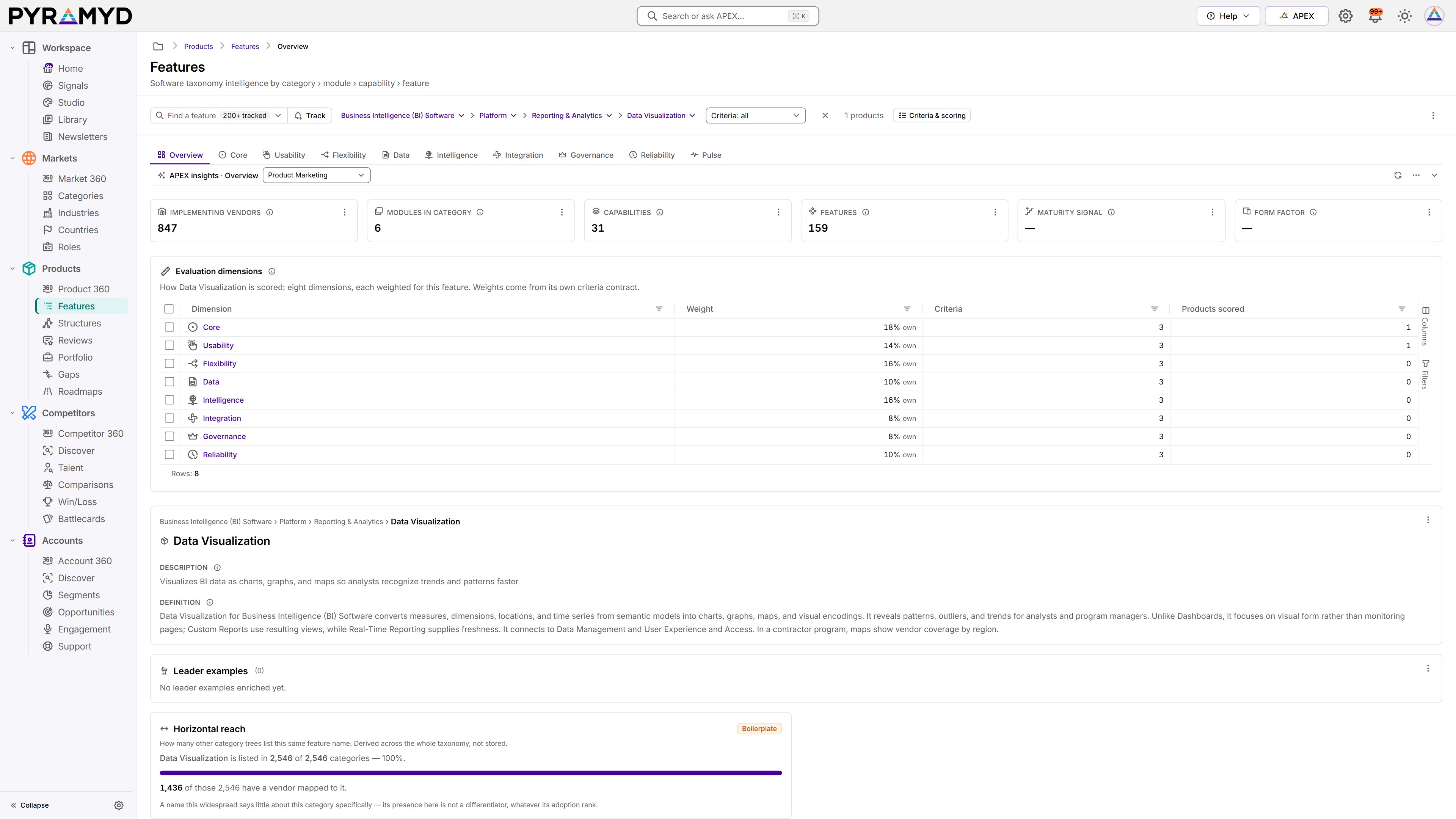
Screens in the app
- Overview
- Core
- Usability
- Flexibility
- Data
- Intelligence
- Integration
- Governance
- Reliability
- Pulse
Plans
Included in Starter (when Products is the hub you pick), Growth, and Enterprise. See pricing
Inside the table
What the Features holds
One row is one standard feature, such as Contact Records in CRM Software, with its capability, module, and category on the same row.
Measured on 22 October 2026 in the production database.
How we measured
Measured on the live tree by docs/data/features-site-stats/gen-features-detail.ts, read-only. Rows: live features (visible, not deleted). Levels: distinct market, functional, and category values, then distinct (category, module) and (category, module, capability) paths, and distinct names. Fields: the app's field-group registry; a field is filled when it is not NULL or empty, and "on most" means filled on more than half of the rows. Links and sources: features with a filled link or review-site column. Vendor products: live vendor rows (visible, not retired, not deleted) on live features.
What’s in the table
190,885
standard features, one per row
6
levels, from 38 markets down to 39,235 capabilities and the features under them
119
fields per row, in 14 groups
3.8 million
vendor product and feature rows mapped onto it (3,847,842 exactly)
Levels
Each level sits inside the one above it. The counts are measured, not estimated.
| Level | What it is | How many |
|---|---|---|
| Market categoryThe broad software market, such as Sales Software. | The broad software market, such as Sales Software. | 38 |
| Functional categoryThe job the software does, such as Customer Relationship Administration Software. | The job the software does, such as Customer Relationship Administration Software. | 295 |
| CategoryThe software category, such as CRM Software.Every one of the 2,546 categories has features. | The software category, such as CRM Software.Every one of the 2,546 categories has features. | 2,546 |
| ModuleA module within a category, such as Sales Execution and Forecasting in CRM Software.3,819 different module names, reused across categories. | A module within a category, such as Sales Execution and Forecasting in CRM Software.3,819 different module names, reused across categories. | 6,469 |
| CapabilityA capability within a module, such as Customer Relationship Tracking.10,687 different capability names. | A capability within a module, such as Customer Relationship Tracking.10,687 different capability names. | 39,235 |
| FeatureThe feature itself, such as Contact Records. One row each.21,588 different feature names, since the same name can appear in many categories. | The feature itself, such as Contact Records. One row each.21,588 different feature names, since the same name can appear in many categories. | 190,885 |
What each row holds
Every field belongs to one group. Overview holds the names and definitions that place a feature; the eight scoring dimensions, from Core to Reliability, each have their own tab in the app; and System is not shown in the app.
Every feature has its identity and its links. The other groups are defined for every feature but empty on most so far: the four judgement fields (lifecycle stage, commoditization, monetization, and expected penetration) are filled on 70, and scoring criteria on 2,205.
| Field group | What it tells you | Example fields | Fields | Filled on most rows |
|---|---|---|---|---|
| Overview20 fields, 16 filled on most rows | Identity and definition: the hierarchy, names, descriptions and what this feature is.For example: Slug, Product category, Product category description, Product category definition | Slug, Product category, Product category description, Product category definition | 20 | 16 of 20 |
| Core10 fields, 0 filled on most rows | Functional completeness and sophistication: what a complete implementation does, where implementations differ, and whether the feature is table stakes.For example: Differentiation axes, Differentiation thesis, Gaps in market, Innovation examples | Differentiation axes, Differentiation thesis, Gaps in market, Innovation examples | 10 | 0 of 10 |
| Usability7 fields, 0 filled on most rows | Workflow fit and effort-to-outcome: the screens, tasks and people the feature must serve well.For example: UI patterns, UX antipatterns, Time to value, Accessibility requirements | UI patterns, UX antipatterns, Time to value, Accessibility requirements | 7 | 0 of 7 |
| Flexibility3 fields, 0 filled on most rows | No-code configure, customize and extend: the levers an admin has without the vendor.For example: Extensibility model, Vertical adaptations, Country specific variants | Extensibility model, Vertical adaptations, Country specific variants | 3 | 0 of 3 |
| Data3 fields, 0 filled on most rows | Managed data: what the feature reads and writes, its data model, freshness and quality.For example: Data model, Data freshness SLO, State management | Data model, Data freshness SLO, State management | 3 | 0 of 3 |
| Intelligence3 fields, 0 filled on most rows | AI and automation: assist, suggest, act; what runs hands-free and what needs a person.For example: AI capabilities, Automation seam, AI displacement risk | AI capabilities, Automation seam, AI displacement risk | 3 | 0 of 3 |
| Integration3 fields, 0 filled on most rows | Feature-level APIs, webhooks, standards and the systems the feature must connect to.For example: API shape, Integration points, Open standards | API shape, Integration points, Open standards | 3 | 0 of 3 |
| Governance6 fields, 0 filled on most rows | The feature-grain slice of security and compliance: permissions, audit, approvals, explainability, safe write-back.For example: Security model, Compliance implications, Regulatory drivers, Data residency posture | Security model, Compliance implications, Regulatory drivers, Data residency posture | 6 | 0 of 6 |
| Reliability3 fields, 0 filled on most rows | Feature-observable accuracy, error behaviour and speed.For example: Performance SLOs, Failure modes, Telemetry | Performance SLOs, Failure modes, Telemetry | 3 | 0 of 3 |
| Scoring contract4 fields, 0 filled on most rows | The criteria and ladders that span all eight dimensions, and where the scores came from.For example: Feature criteria, Evaluation criteria, Feature rubrics, Scoring provenance | Feature criteria, Evaluation criteria, Feature rubrics, Scoring provenance | 4 | 0 of 4 |
| Market and GTM22 fields, 0 filled on most rows | Buyers, positioning, pricing, adoption and alternatives: commercial context, not scored.For example: Value props, Discovery questions, Demo script, Objections | Value props, Discovery questions, Demo script, Objections | 22 | 0 of 22 |
| Links13 fields, 3 filled on most rows | Pointers to other nodes: the other taxonomies and the features this one depends on or sits beside.For example: Category links, Business capability links, Business process links, Business value links | Category links, Business capability links, Business process links, Business value links | 13 | 3 of 13 |
| Pulse5 fields, 0 filled on most rows | Source mirrors and enrichment freshness.For example: G2 feature list, TrustRadius feature list, GetApp feature list, Enrichment version | G2 feature list, TrustRadius feature list, GetApp feature list, Enrichment version | 5 | 0 of 5 |
| System17 fields, 12 filled on most rows | Runtime plumbing: identifiers, timestamps, visibility, embeddings, prompt linkage, provenance. Not shown as a tab.For example: ID, Created at, Updated at, Deleted at | ID, Created at, Updated at, Deleted at | 17 | 12 of 17 |
| All groups119 fields, 31 filled on most rows | A field counts as filled on most rows when more than half the rows hold a value. | 119 | 31 of 119 |
A real row: Contact Records
- Market categorySales Software
- Functional categoryCustomer Relationship Administration Software
- CategoryCRM Software
- ModuleSales Execution and Forecasting
- CapabilityCustomer Relationship Tracking
- This rowContact Records
- 4 other features share its capability, and the module holds 6 capabilities and 26 features in all.
- 1,183 vendor products are mapped to it, and 578 of those mappings carry a score drawn from reviews.
- Definition
- “Contact Records for CRM Software Stores names, roles, channels, consent, and preferences from entry, imports, and account links, producing profiles for identification and routing.”
- Roles that use it
- Relationship Management
- Business value
- Retain and Grow Current Customers
Like every feature, its profile groups are still empty. Its links each record the reason for the link and where it came from.
How it connects
Vendor products
3,847,842 of the 3,847,842 vendor product and feature rows point to a standard feature, covering 94,844 of the features (49.7%).
Roles
114,631 features (60.1%) link to the roles that use them.
Business value
110,932 features (58.1%) link to the business value they deliver, 45,791 to business processes and 107,633 to business capabilities.
Industries
43,109 features (22.6%) link to the industries where they matter.
Categories
2,546 categories hold every feature; each feature sits under exactly one.
Where it comes from
Each category has one standard list of features. 26.4% of the features were matched from the feature lists on review sites.
- 50,451 features (26.4%) were matched from review-site feature lists: 21,853 from TrustRadius, 36,176 from GetApp, Capterra, and Software Advice, and 17,285 from G2.
- The profile has not been written for any feature yet; the four judgement fields are filled for 70.
- Fields written
- 25 August – 18 October 2026
- Latest change to any row
- 20 October 2026
- Refresh
- Enrichment is paused, so no refresh is scheduled and the dates above are the latest.
- Measured
- 22 October 2026
In PYRAMYD
In the app, Features opens from Products › Features, with these 10 tabs:
- Overview
- Core
- Usability
- Flexibility
- Data
- Intelligence
- Integration
- Governance
- Reliability
- Pulse
- Search, and filter by category, module, capability, and feature.
- Track a feature: your tracked features show on the module's first page, ready to open.
- Each of the ten tabs has its own address, so you can link straight to one.
- APEX and its agents work with the record you have open.
Browse the taxonomy
Features in the graph
Click any node to see what it links to, then widen the view to 2 or 3 hops.
Production slice · extracted 12 Aug 2026
Features in the real graph, with the products that offer each one.
~7 MB · click any node, then show 1, 2, or 3 hops — loads on demand so this page stays fast
More in Products

Product 360
See any product the way its buyers do.

Structures
Map your own product catalog onto the market's.

Reviews
Hear what buyers say about any product, in their own words.

Portfolio
Keep your own catalog in one place, ready for the teams that build, position, and sell it.

Gaps
Find where a rival's feature beats yours, and what it takes to close it.

Roadmaps
Plan in the tools you already use, with each gap linked back to its feature.
See Features with your own product.
Request access, or book a session and we'll walk through it with your product, your competitors, and your accounts.